
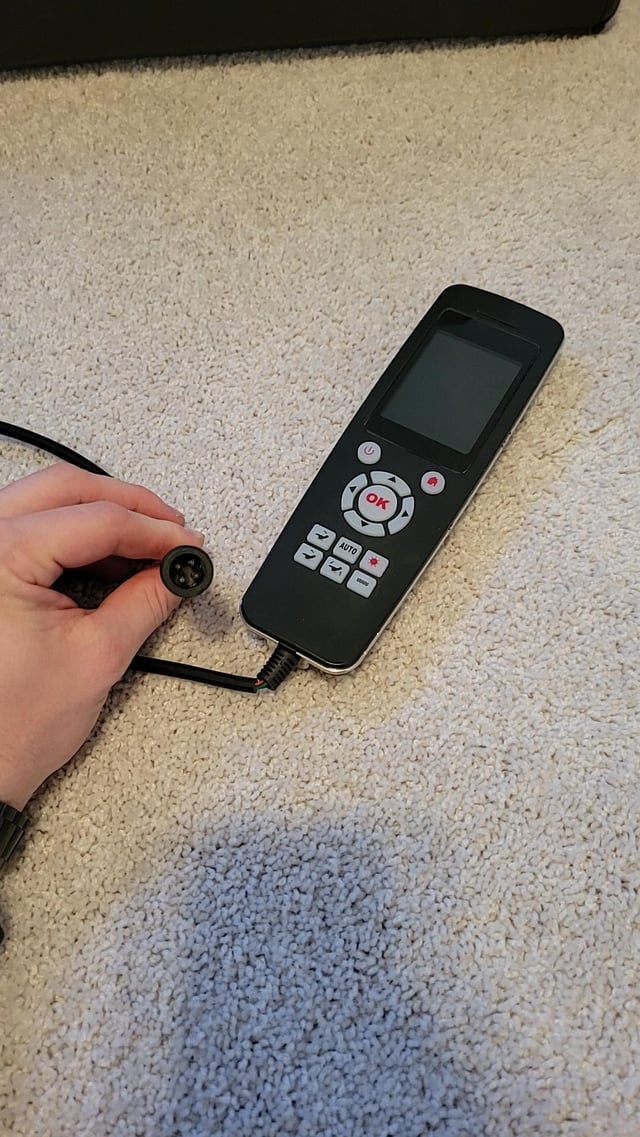
A massage chair remote is more than a convenience accessory. It is usually the main interface for selecting massage programs, adjusting intensity, moving rollers, controlling air compression, reclining the chair, and saving personalized settings. When the remote stops working, the chair may feel unusable even if its motors and massage system are still in good condition.
Most problems have a simple cause: a loose cable, drained batteries, an obstructed sensor, a locked control panel, or a remote that is not compatible with the chair. The right fix depends on whether your massage chair remote control is wired or wireless and on the manufacturer’s design.
This guide explains how to identify your remote type, pair compatible wireless controls, choose a massage chair remote replacement safely, and troubleshoot common issues without guessing or forcing parts.
Identify the Type of Massage Chair Remote You Have
Before attempting to pair, reset, or replace a remote, determine how it communicates with the chair. Massage chairs commonly use one of three control systems.
| Remote type | How it connects | What this means for troubleshooting |
|---|---|---|
| Wired handheld remote | A cable runs directly from the remote to a port on the chair. | Pairing is usually unnecessary. Check the cable, plug, connector pins, and chair-side port first. |
| Wireless remote | Uses a radio signal, Bluetooth, infrared, or another wireless connection. | May need batteries, a pairing procedure, a clear signal path, or a receiver reset. |
| Built-in control panel or app-based control | Buttons are mounted on the chair, or the chair connects to a phone app. | A problem may involve the chair’s control module, app permissions, network connection, or firmware rather than a separate remote. |
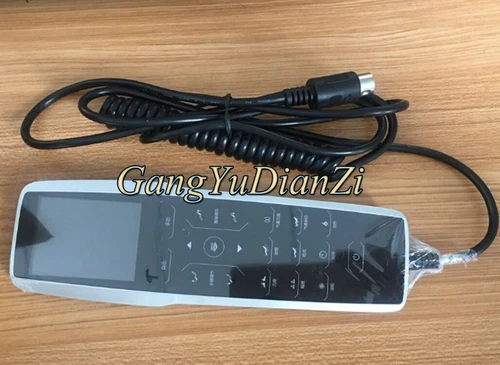
A wired remote is common on full-size massage chairs because it provides a stable connection and does not depend on batteries. It may look like a wireless handset at first glance, but the cable is often tucked into an armrest pocket or routed beneath trim.
Do not assume every remote for a massage chair can be paired. Many wired controllers are programmed specifically for one chair series and will only work when the connectors, wiring layout, voltage requirements, and control signals match.
Check the Simple Causes Before Resetting Anything
Start with the least invasive checks. These steps can resolve many remote issues and reduce the risk of changing settings unnecessarily.
- Confirm the chair has power. Check that the power cord is firmly seated, the wall outlet works, and the main power switch is in the on position. Some chairs have a secondary switch near the power inlet.
- Wait for the chair to finish starting up. After being switched on, a chair may take a short time to initialize. Avoid pressing multiple buttons while it is moving to its starting position.
- Inspect the emergency stop or safety features. Some models disable functions after an emergency stop is pressed, after a safety sensor is triggered, or when a footrest is blocked.
- Check the batteries on wireless remotes. Replace all batteries with fresh, matching batteries. Do not mix old and new cells or different battery types.
- Look for physical damage. Cracked cases, sticky keys, liquid residue, worn cable insulation, bent plugs, and corroded battery contacts can all prevent normal operation.
- Turn the chair off before reconnecting a wired controller. If the remote cable is detachable, power the chair down first, then reconnect the plug gently and fully.
If the display lights up but buttons do not respond, the issue may be a button lock, a frozen controller, or a communication problem. If the remote is completely blank, focus first on power, batteries, cable condition, and the display itself.
How to Pair a Wireless Massage Chair Remote
Pairing instructions vary by brand and model, so the owner’s manual is the best source for the exact button sequence. Some remotes are factory-paired and cannot be paired manually. Others can only be paired with a specific receiver or control board.
Use the following general process only when your chair documentation indicates that the remote supports pairing.
Prepare the Chair and Remote
- Place fresh batteries in the remote, observing the polarity markings.
- Move close to the chair so distance and interference are less likely to affect the process.
- Turn off nearby devices that may create interference if the manual recommends doing so.
- Make sure the chair is connected to power and not in a fault, transport, or safety-stop condition.
- Remove anything blocking an infrared receiver window, if the chair uses infrared control.
Enter Pairing Mode Only as Directed by the Manual
Depending on the model, pairing mode may be started by holding a button on the chair, pressing a recessed receiver button, using a specific remote key combination, or cycling power in a prescribed order. A light, display icon, or beep may indicate that the chair is ready to connect.
Once pairing mode is active, follow the manual’s timing instructions exactly. Some systems require holding a remote button for several seconds; others pair when the remote is switched on or when a designated key is pressed. If the chair confirms the connection, test basic functions such as power, program selection, and recline before assuming every control is working.
When Pairing Does Not Work
Repeated pairing attempts are unlikely to help if the remote is not designed for that chair. Stop and verify the model number of both the chair and remote. A similar-looking controller may use different signals, button mapping, or firmware.
Also remember that an infrared remote needs a direct line of sight to the receiver. A wireless radio remote may work through some materials, but thick furniture panels, metal components, or electronic interference can reduce range. Keep the remote near the chair while testing.
Wired Massage Chair Remote Problems and Cable Checks
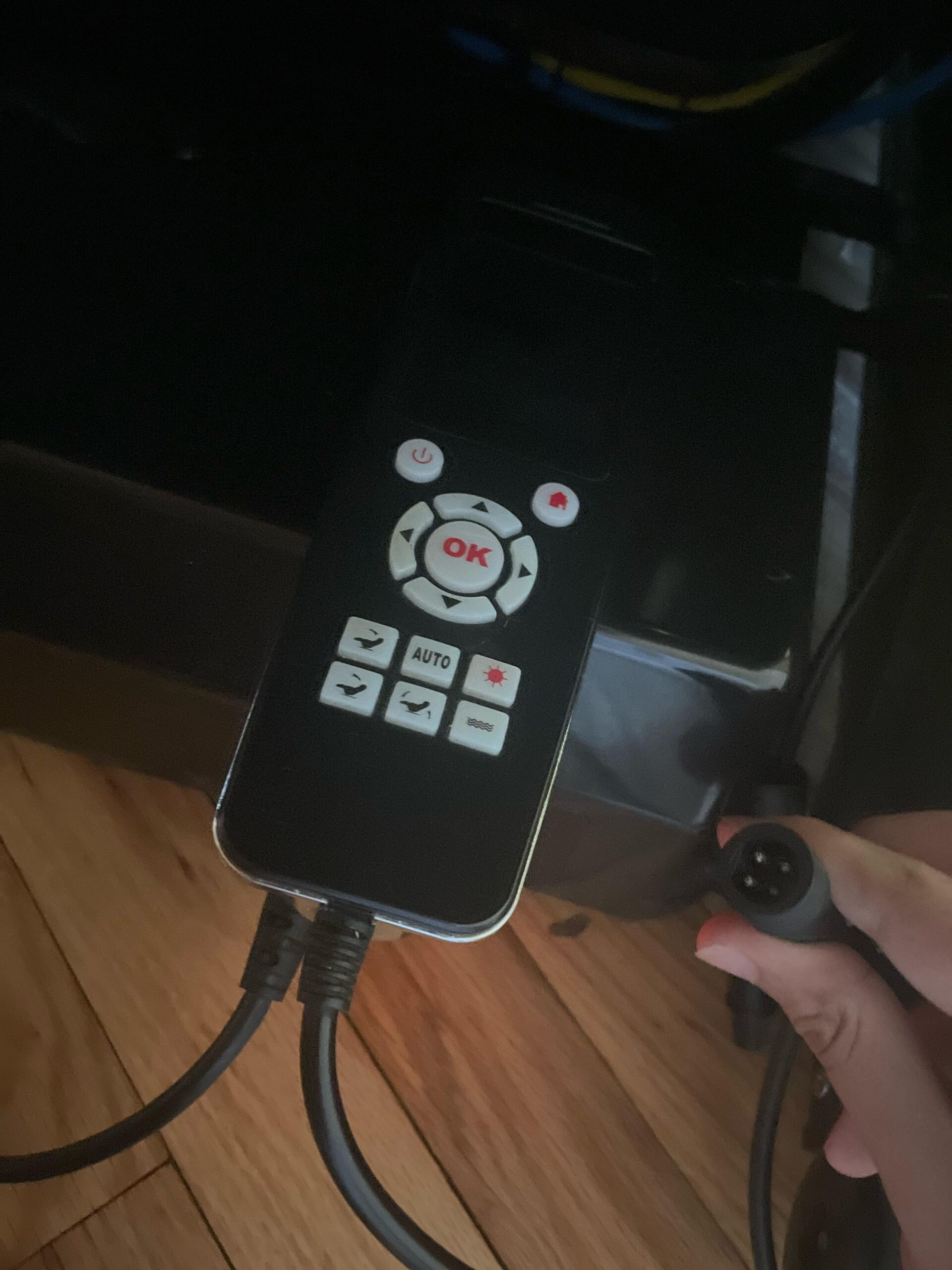
Wired massage chair remotes do not normally require pairing. Their most common failures involve the cable, connector, remote housing, or chair-side control port.
Credit: reddit.com
Inspect the Cable Without Pulling or Twisting It
Run your fingers lightly along the cable and look for flattened sections, sharp bends, exposed wires, or areas damaged by a recliner mechanism. Cables can be pinched where the chair reclines, near the armrest, or where the controller is stored.
If the cable feels loose at the remote or chair connection, do not force it deeper or bend the plug pins. Turn off and unplug the chair before checking a detachable connection. Align the plug correctly, insert it straight, and secure any locking collar or retaining clip according to the manual.
Look for Connector Mismatch
A connector that physically fits is not automatically compatible. Massage chair controllers may have plugs with a similar shape but different pin assignments. Connecting an unsuitable replacement can leave the chair unresponsive and may damage components in some designs.
For a wired massage chair remote replacement, match all available identification details:
- The chair brand and full model number
- The remote’s part number, label, or revision code
- Connector shape, pin count, keyway, and locking mechanism
- Button layout and display configuration
- Any compatibility information supplied by the manufacturer or authorized service provider
Do Not Repair a Damaged Cable With Tape Alone
Electrical tape may cover cosmetic damage, but it does not reliably restore internal wires or provide a safe long-term repair. If insulation is split, wires are visible, or the cable has been crushed, stop using the chair and arrange for an appropriate replacement or professional service. Avoid opening the remote or chair control compartment unless the manufacturer specifically provides user-service instructions.
How to Choose the Right Massage Chair Remote Replacement
A massage chair remote replacement should be chosen by compatibility, not appearance. Universal remotes are common for televisions and simple consumer electronics, but full-featured massage chairs often use proprietary controls. Features such as body scanning, roller position, zero-gravity recline, heat, foot rollers, air cells, and saved programs require the correct command set.
Find the Correct Identification Numbers
Look for the chair’s model label before shopping. It may be located near the power cord, on the back of the chair, under a side panel, or beneath the seat area. Record the complete model number rather than only the product name.
Next, inspect the existing remote. The useful identifier may appear on the back of the handset, inside the battery compartment, on the cable tag, or near the connector. Take clear photos of the label and plug before contacting the manufacturer or parts supplier.
Prefer an Original or Confirmed Compatible Part
The safest option is an original equipment remote supplied by the chair manufacturer, an authorized dealer, or an authorized repair provider. If an original part is unavailable, ask for written confirmation that the replacement is compatible with your exact chair model and revision.
Be cautious with listings that say a remote is “universal” or “fits most massage chairs” without naming supported models. A generic handset may have buttons with familiar labels but still be unable to communicate with the chair.
Questions to Ask Before Ordering
- Is this remote confirmed to work with my exact chair model?
- Is it wired or wireless, and does it include the correct cable or receiver if needed?
- Does it require pairing, programming, or a service-mode setup?
- Will all original chair functions work, including recline and legrest controls?
- Is the replacement new, refurbished, or used?
- What is the return policy if it does not match the listed compatibility?
A used remote can be appropriate when a chair is older and replacement parts are limited, but only when its condition and exact part number can be verified. Wear around buttons, battery terminals, cable strain relief, and connectors matters because these components receive frequent use.
Common Massage Chair Remote Symptoms and Likely Causes
| Symptom | Likely causes | Practical next step |
|---|---|---|
| Remote display is blank | Dead batteries, poor battery contact, loose cable, no chair power, failed display | Check chair power, replace batteries, inspect contacts, and reconnect a detachable cable with power off. |
| Remote lights up but chair does nothing | Chair safety lock, loose wired connection, failed receiver, incorrect replacement remote | Check for safety conditions and confirm the remote part number and connection. |
| Only some buttons work | Worn or sticky buttons, liquid contamination, software issue, restricted mode | Restart the chair, check the manual for lock modes, and seek service if controls remain inconsistent. |
| Wireless remote works only close to the chair | Weak batteries, interference, blocked infrared receiver, signal problem | Install fresh batteries and test with a clear path near the chair. |
| Chair moves but massage functions will not start | Program setting, body-position requirement, safety sensor, internal chair fault | Return the chair to its normal position, check the manual, and note any display message. |
| Remote commands activate the wrong function | Incorrect remote, incomplete pairing, control-board fault | Stop using the remote and verify compatibility before trying further commands. |
Credit: ebay.com
Reset a Frozen Controller Safely
A basic power reset can clear a temporary communication problem. It will not repair a broken cable, damaged remote, failed circuit board, or incompatible replacement, but it is a reasonable step when the chair and remote suddenly stop responding.
- End the current massage program if the controls still respond.
- Switch the chair off using its main power switch.
- Unplug the chair from the wall outlet.
- Wait briefly before reconnecting it. This gives the control system time to shut down fully.
- Reconnect the power cord directly to a suitable wall outlet and turn the chair on.
- Allow the chair to initialize without pressing buttons immediately.
- Test one basic function at a time, starting with power or a simple automatic program.
If your chair manual provides a specific reset process, use that procedure instead. Avoid repeatedly switching power on and off in quick succession, and do not unplug a chair while a mechanism is moving unless the manual instructs you to do so for safety.
When the Remote Problem May Actually Be the Chair
It is easy to blame the controller when the chair does not respond, but the fault may be elsewhere. A working remote cannot overcome a problem with the chair’s power supply, control board, wiring harness, motors, recline mechanism, sensors, or safety system.
Signs that professional diagnosis may be needed include a burning smell, smoke, sparks, unusual heat near electrical parts, repeated breaker trips, grinding or loud mechanical noises, exposed wiring, or a chair that moves unpredictably. Turn the chair off, unplug it, and do not continue testing if any of these signs occur.
You should also seek qualified service when the chair shows an error message you cannot clear using the manual, when a replacement remote is confirmed compatible but still does not work, or when the remote cable runs inside the chair and may require upholstery or mechanism disassembly to inspect.
Care Tips That Help a Remote Last Longer
Remote failures are often preventable. The controller is exposed to hand oils, spills, pressure from being sat on, and strain from being pulled by its cable. Small habits can reduce wear.
- Return the remote to its holder or pocket after each use.
- Keep drinks away from the handset and armrest controls.
- Clean the surface with a soft, lightly damp cloth only when the chair is powered off; do not spray cleaner directly onto buttons or screens.
- Never lift, reposition, or drag the chair by the remote cable.
- Check that the cable has enough slack before reclining the chair.
- Remove batteries from a wireless remote if the chair will be stored for an extended period.
- Keep the model number, remote part number, purchase records, and manual in an accessible place.
A compatible massage chair remote is a specialized component, not just an accessory. Confirm the chair’s power and safety status first, identify whether the remote is wired or wireless, and use exact model information before ordering a replacement. That approach prevents unnecessary purchases and helps protect the chair’s electronics.

Credit: reddit.com
Frequently Asked Questions
Can I use my phone as a remote for a massage chair?
Only if the chair manufacturer provides a compatible mobile app or specifically supports phone-based control. A standard phone cannot usually replace a proprietary wired or wireless massage chair remote on its own.
Why does my remote beep but the chair will not move?
A beep may confirm that the remote received your button press, not that the chair accepted the command. Check for a safety lock, blocked footrest, recline obstruction, power issue, or an error shown on the chair display.
Can a remote from a similar massage chair model work on mine?
Possibly, but similarity is not enough. Two chairs from the same brand may use different wiring, software, button functions, or control boards. Use a remote only when compatibility is confirmed for your exact model.
Should I replace the remote or repair it?
Replacement is often the simpler option when an original or verified compatible part is available. Repair may be worthwhile for an older chair with an unavailable controller, but cable, circuit-board, and display repairs should be handled by a qualified technician.
How can I keep a replacement remote from getting damaged?
Store it in its designated holder, keep liquids away, avoid trapping its cable in moving chair parts, and use gentle cleaning methods. For wireless units, replace batteries promptly if leakage or corrosion appears.
1 thought on “Massage Chair Remote: Pairing, Replacement and Troubleshooting Tips”