
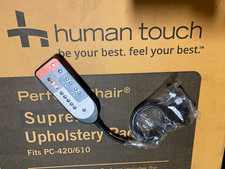
A Human Touch massage chair remote is the control center for your chair’s massage programs, recline position, intensity settings, heat functions, and air compression features. When it stops responding, the cause may be as simple as a loose cable or depleted batteries, but it can also involve the chair’s power supply, handset connection, or an incompatible replacement remote.
Human Touch has produced many massage chair models over the years, and remote controls are not universally interchangeable. Some chairs use a wired handset connected directly to the chair, while others use a wireless remote or a model-specific control system. The safest approach is to identify the exact chair model before pairing, replacing, or troubleshooting the remote.
This guide explains how to check your remote type, attempt pairing when applicable, choose the correct replacement, and work through common problems without guessing at model-specific settings.
Identify Your Human Touch Massage Chair Remote Type First
Before trying to pair or replace a remote, determine whether your chair uses a wired or wireless controller. This matters because most wired remotes do not need pairing at all.
Wired remote controls
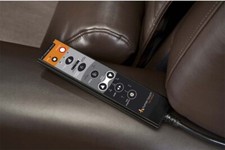
A wired Human Touch massage chair remote control has a cable running from the handset to the chair. The cable may plug into the side of the chair, under an armrest, near the rear base, or into a control module underneath the seat.
With this design, communication happens through the cable. If the remote is unresponsive, the likely issues include:
- A loose or partially disconnected plug
- A damaged cable, especially near the handset or connector
- A bent pin or debris inside the connector
- A chair power issue rather than a remote issue
- A failed handset or internal control board
There is normally no wireless pairing process for a wired handset.
Wireless remote controls
A wireless remote has no permanent communication cable connecting it to the chair. It may operate with replaceable batteries, a rechargeable battery, Bluetooth, radio frequency communication, or a chair-specific receiver.
Wireless remotes can lose communication after a battery change, a long period without use, electrical interruptions, or replacement of the remote. However, whether pairing is possible—and the exact procedure—depends on the chair model.
Built-in control panels and app-based controls
Some Human Touch chairs also have buttons built into the armrest or side panel. Newer designs may support mobile-app controls in addition to a handset. If the built-in buttons work but the remote does not, the chair itself is receiving power and the issue is more likely isolated to the remote, its cable, batteries, or pairing status.
Find the Exact Chair Model Before Pairing or Ordering Parts
The chair’s name alone is often not enough to identify the correct remote. Product lines can include several versions with different electronics and control layouts. A remote that looks similar may use a different connector, button mapping, firmware, or signal protocol.
Look for the model and serial information on the chair’s identification label. Depending on the design, the label may be located:
- On the rear or underside of the chair base
- Under the seat cushion or ottoman area
- Near the power cord, power switch, or transformer connection
- On the frame beneath a removable cover
Record the full model name, model number, and serial number if available. Take clear photos of the existing remote, its connector, the remote cable, and the chair’s data label. These details make it much easier to confirm compatibility with Human Touch support, an authorized service provider, or a reputable parts seller.
How to Pair a Wireless Human Touch Massage Chair Remote
Pairing instructions are model-specific, so use the chair’s manual whenever possible. Do not repeatedly press random button combinations, especially on a remote with service or reset controls. Instead, start with the basic process below and stop if your model’s instructions differ.
Prepare the chair and remote
- Turn the chair off using its main power switch, if it has one.
- Unplug the chair from the wall outlet for a short period.
- Check the remote’s batteries or charging status. Replace disposable batteries as a complete matching set.
- Inspect the battery contacts for corrosion, moisture, or debris.
- Place the remote close to the chair, ideally within a few feet, before restoring power.
- Plug the chair directly into a known working wall outlet when practical. Avoid troubleshooting through a questionable extension cord or overloaded power strip.
After restoring power, switch the chair on and wait for it to finish any startup sequence. Some massage chairs need a brief moment to initialize before they can accept commands.
Use the model-specific pairing method
On chairs designed for wireless pairing, the process commonly involves placing the chair or remote into a connection mode and then holding a designated button or button combination. The correct button may be labeled with a power symbol, settings icon, Bluetooth symbol, or another control unique to that remote.
Because the button sequence varies by model, do not assume instructions for another Human Touch chair will work on yours. A manual for a different chair can lead to unnecessary resets or confusion. If you do not have the manual, use the exact model number to request the proper instructions from the manufacturer or an authorized service source.
Confirm that pairing worked
Once the chair recognizes the remote, test simple functions first. Try power, a basic automatic massage program, and a manual stop command. Then check other controls such as recline, footrest movement, massage intensity, or heat if your chair includes them.
If only some buttons work, the remote may be paired but have a damaged keypad, worn button membrane, or an internal fault. It may also be a replacement controller that is not fully compatible with the chair.
Troubleshooting a Remote That Does Not Respond
Work from the simplest checks to the more involved ones. This approach helps separate a remote problem from a chair power or mechanical problem.
| Symptom | Likely Cause | Useful First Check |
|---|---|---|
| Remote screen is blank | Dead batteries, discharged battery, loose cable, or failed handset | Replace or charge batteries; check the cable connection if wired |
| Remote lights up but chair does nothing | Lost pairing, unplugged cable, chair power issue, or incompatible remote | Check the chair’s main switch and outlet, then verify the remote connection or pairing instructions |
| Some buttons work, others do not | Worn keypad, moisture damage, or partial internal failure | Test each control and inspect for sticky or recessed buttons |
| Chair starts but stops unexpectedly | Power interruption, cable strain, overloaded circuit, or chair fault | Check the power connection and make sure the remote cable is not being pulled or pinched |
| Remote works only at a certain angle or distance | Weak batteries, wireless interference, or receiver issue | Install fresh batteries and operate the remote close to the chair |
Credit: ebay.com
Check the chair’s power supply
It is easy to blame the remote when the chair has actually lost power. Verify that the main power switch is on, the power cord is securely seated, and the outlet works with another low-risk device. If the chair uses an external transformer or power supply, inspect it for a loose connection or visible damage.
Do not use a damaged power cord, cracked transformer housing, or loose plug. Electrical repairs inside a massage chair should be handled by a qualified technician.
Inspect a wired remote connection
Turn the chair off and unplug it before handling the remote connector. Follow the cable from the handset to the chair and look for sharp bends, crushed sections, cuts, or areas repeatedly pulled during reclining.
If the connector is accessible, make sure it is fully seated and aligned correctly. Do not force it. Many multi-pin connectors can be damaged if inserted at an angle. Avoid cleaning contacts with liquids or spraying cleaners into the port. A dry, soft brush or a brief inspection for visible lint is safer than applying moisture.
Check batteries correctly
For a wireless Human Touch massage chair remote, weak batteries can create inconsistent behavior rather than a complete shutdown. The display may turn on, yet the signal may be too weak for reliable operation.
- Use new batteries of the correct type listed in the remote or manual.
- Replace all batteries at the same time.
- Match the positive and negative markings carefully.
- Do not mix old and new batteries or different battery chemistries.
- Remove leaking batteries immediately and avoid touching leaked material with bare skin.
If the battery compartment has corrosion, do not continue using the remote until the contacts have been assessed and cleaned appropriately. Severe corrosion can permanently damage the handset.
Perform a basic power reset
A power reset can help when the chair’s control system has become temporarily unresponsive. Switch the chair off, unplug it, and leave it disconnected briefly. While it is unplugged, avoid pressing or forcing the chair’s moving parts. Restore power, let the chair initialize, and test the remote again.
A reset will not repair a broken cable, damaged circuit board, failed actuator, or incompatible replacement remote. It is simply a safe first step for a temporary electronic communication problem.
Replacing a Human Touch Massage Chair Remote
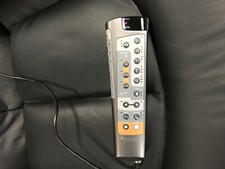
The best replacement is an original remote made for your exact chair model or a verified compatible part identified by model number and connector type. Similar-looking universal massage chair remotes are rarely a dependable substitute for a branded, model-specific controller.
Credit: ebay.com
What to verify before buying
Before ordering a replacement, compare more than the photos. Confirm:
- The exact Human Touch chair model and version
- The replacement remote’s part number, if listed
- Whether the controller is wired or wireless
- The connector shape, pin layout, and cable orientation for wired remotes
- Whether the remote needs pairing, programming, or a matching receiver
- Whether the remote is new, refurbished, or used
- The seller’s return policy in case the part does not match
A controller from a related chair series may have the same housing and similar buttons but still fail to operate your chair. Differences in recline motors, airbags, massage programs, or heating controls can require different electronics.
Original, used, and aftermarket replacement options
An original equipment replacement is generally the lowest-risk option when available. It is designed around the chair’s controls and connection system. Availability may be limited for discontinued models, however.
A used original remote can be useful for an older chair if the seller can verify the part number and condition. Ask whether the cable, connector, display, and buttons have been tested. Keep in mind that a used handset may have hidden wear, especially around frequently pressed buttons and cable strain points.
Aftermarket or generic remotes require extra caution. Unless a seller clearly documents compatibility with your exact model, treat broad claims such as “fits Human Touch massage chairs” as incomplete. A remote must communicate correctly with the chair, not merely have a similar plug.
When the remote may not be the failed part
Replacing the handset will not solve every control problem. If a known-good compatible remote does not work, the issue may be in the chair’s wiring harness, receiver, control board, power supply, or one of its safety circuits.
Signs that point beyond the remote include:
- The chair has no power indicators or response from any controls
- Built-in buttons are also unresponsive
- The chair makes clicking sounds but will not begin a program
- A wired remote works only when its cable is held in a certain position
- The chair stops in a reclined position or moving parts behave irregularly
- You notice a burning smell, overheating, sparking, or repeated tripping of a breaker
In those situations, stop using the chair and arrange qualified service rather than continuing to reset or disassemble it.
Common Mistakes to Avoid
Ordering by appearance alone
Photos are helpful, but they are not a compatibility guarantee. The same remote shell may be used across several products with different internal programming. Always match the model and, when possible, the original part number.
Forcing a cable connector
If a connector does not slide in easily in the correct orientation, stop and inspect it. Forcing a multi-pin plug can bend contacts or damage the chair-side port, turning a simple remote replacement into a larger repair.
Assuming every remote can be paired
Many massage chair handsets are wired and do not use a pairing process. If your remote has a cable, focus on the connection, cable condition, and chair power before looking for wireless pairing instructions.
Ignoring cable routing after installation
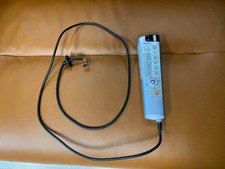
After fitting a wired replacement remote, route the cable so it will not be trapped by the recline mechanism, footrest, or moving frame. Leave enough slack for the chair’s full range of motion, but avoid loose loops that can catch on furniture or feet.
Opening the remote too quickly
Disassembling a remote can damage clips, seals, flat cables, or small internal parts. It may also make returns impossible. Start with external checks and only consider internal inspection if you are qualified to do so and the remote is no longer covered by a return or warranty policy.
Care Tips That Help Your Remote Last Longer
Remote controls are exposed to hand oils, spills, dropped objects, and cable strain. A few simple habits can reduce avoidable damage.
- Store the remote in its holder when the chair is not in use.
- Keep drinks away from the handset and chair-side control area.
- Clean the exterior with a soft, lightly dampened cloth only after checking the chair’s care instructions.
- Do not pull the chair by the remote cable.
- Keep the cable away from the reclining frame and footrest joints.
- Remove batteries if a wireless remote will be stored unused for an extended period.
- Use the chair on a stable electrical connection and avoid damaged surge protectors or power strips.
If the chair is moving or reclining, keep the remote cable clear of its path. This is especially important after repositioning the chair in a room, when cable routing may have changed.
Credit: ebay.com
Frequently Asked Questions
Can I use a universal remote with a Human Touch massage chair?
Usually not reliably. Massage chair controls are often model-specific, with unique wiring, button assignments, and communication methods. Use a remote confirmed for your exact chair model rather than relying on a universal or visually similar controller.
Why does my remote display work but the chair will not move?
The remote may have power while the chair has a separate issue, such as a switched-off main power control, loose chair-side connection, lost wireless communication, or an internal control problem. Check the chair’s power supply and any built-in controls before replacing the remote.
Do replacement remotes come with batteries?
That depends on the seller and the remote type. Do not assume batteries are included. Check the listing or packaging details, then install the battery type specified for the remote.
Can a damaged remote cable be repaired?
A damaged cable may be repairable by a qualified electronics or appliance technician, but the practical choice depends on the cable design and the location of the damage. Replacing the complete compatible handset is often safer than using a poorly insulated or incorrectly wired repair.
What should I do if my chair is stuck reclined and the remote has failed?
Turn the chair off and disconnect power before inspecting accessible connections. Do not force the backrest, footrest, or mechanisms by hand. Contact Human Touch support or a qualified service provider with the chair model and symptoms, particularly if the chair uses powered recline components.